Drag-and-drop layouts
Pages with a sidebar, cards, tabsets and value boxes, built from modern bslib components rather than legacy fluidRow() grids.
app.R code
DropToApp is a Shiny UI designer for data scientists and R users. Lay out sidebars, cards, grids and tabs,
add inputs and outputs, and watch the Shiny and bslib code write itself, ready to run with
shiny::runApp().
Free to use. Your designs stay in your browser.
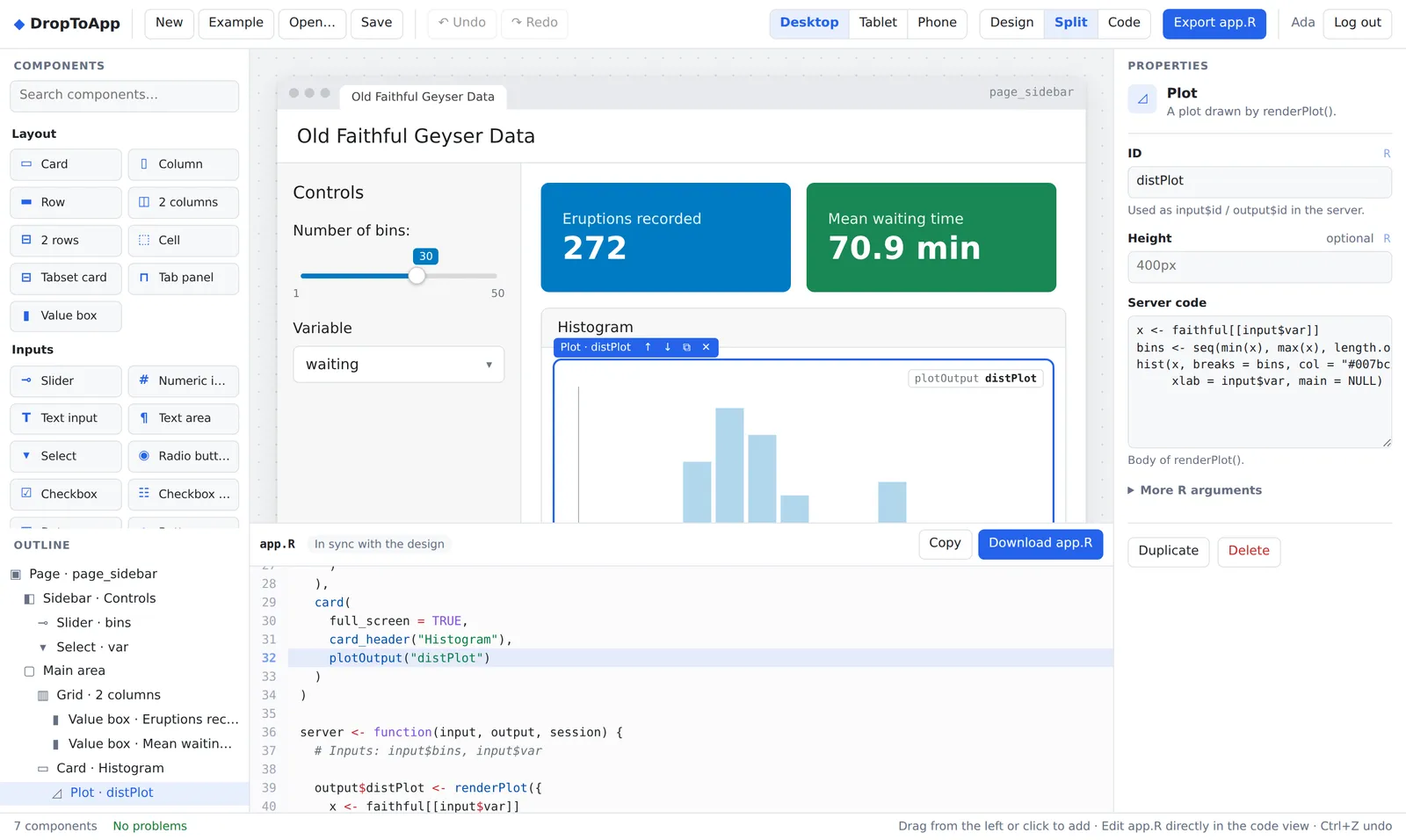
Building a Shiny UI by hand means nesting function calls and remembering argument names. DropToApp lets you see the layout while you build it, and still gives you code you'd be happy to write yourself.
Pages with a sidebar, cards, tabsets and value boxes, built from modern bslib components rather than legacy fluidRow() grids.
Add a column or row one cell at a time, split cells, and nest grids inside grids. Column widths stay balanced automatically.
Type in app.R and the canvas updates as you go. Change the design and the code is regenerated. Errors show the line and column.
Sliders, selects, buttons, plots, tables and more, each with its server code: renderPlot(), renderTable() and observeEvent() blocks are written for you.
Import an app.R and keep working visually. Code DropToApp has no editor for, such as DT tables or helper functions, is kept exactly as written.
Preview Bootswatch themes and check the layout at desktop, tablet and phone widths before you run a single line of R.
No setup and nothing to install: DropToApp runs in your browser.
Start from an example or a blank page, then drop layouts, inputs and outputs where you want them.
Set IDs, labels, choices and widths in the properties panel, or edit the R code directly. Both stay in sync.
Download app.R and run it with shiny::runApp(), locally or on Shiny Server, Posit Connect or shinyapps.io.
DropToApp writes the same functions you'd use by hand, so the code is easy to read, extend and maintain.
page_sidebar(), page_fillable(), page_fluid()sidebar() and card() with headerslayout_columns() grids of rows and columnsnavset_card_tab() with nav_panel() tabsvalue_box() for key numberssliderInput(), numericInput()textInput(), textAreaInput()selectInput(), radioButtons()checkboxInput(), checkboxGroupInput()dateInput(), actionButton()plotOutput() with renderPlot()tableOutput() with renderTable()textOutput() and verbatimTextOutput()DT::DTOutput()Whether you ship dashboards every week or are building your first Shiny app.
Prototype a dashboard layout in minutes, then spend your time on the analysis instead of on nested UI code.
Turn an R analysis into an interactive app your colleagues can use, without becoming a web developer first.
See how every part of the interface maps to Shiny code. It's a hands-on way to learn how Shiny apps are built.
DropToApp is a visual editor for R Shiny user interfaces. You drag layouts, inputs and outputs onto a canvas, adjust them in a properties panel, and DropToApp writes a complete, readable app.R file using Shiny and bslib as you work.
Not to design the interface: layouts, inputs and outputs are all point-and-click. To connect your own data and logic you write R in each output's server code field, and seeing the generated code next to the design is also a practical way to learn how Shiny apps are put together.
No. The export is plain Shiny and bslib code with no DropToApp package or runtime. Install the two packages with install.packages(c("shiny", "bslib")) and run the app with shiny::runApp(), locally, on Shiny Server, Posit Connect or shinyapps.io.
Yes. Open an app.R whose UI uses page_sidebar(), page_fillable() or page_fluid() and DropToApp rebuilds the design from it. Anything it has no visual editor for is kept as an R code block, and code outside the UI (data loading, reactives, helper functions) is preserved as written.
Yes. The code view is a full editor: type in app.R and the canvas updates as you go, or change the design and the code is regenerated. Syntax errors are pointed out with the line and column, and the design waits until the code is valid again.
Page layouts with a sidebar, cards, grids of columns and rows, tabsets, value boxes, sliders, numeric and text inputs, text areas, select inputs, radio buttons, checkboxes, date inputs, action buttons, plot, table, text and console outputs, headings and paragraphs, plus R code blocks for anything else.
In your own browser. Designs are autosaved locally and never uploaded to our servers; you can save a design file or export app.R at any time. Your account is only used to sign you in.
Yes, creating an account and using the editor is free.
Create a free account and have your first layout on screen in a minute.
Create a free account